- Sanzida Afrin
- 0 Comments
- 253 Views
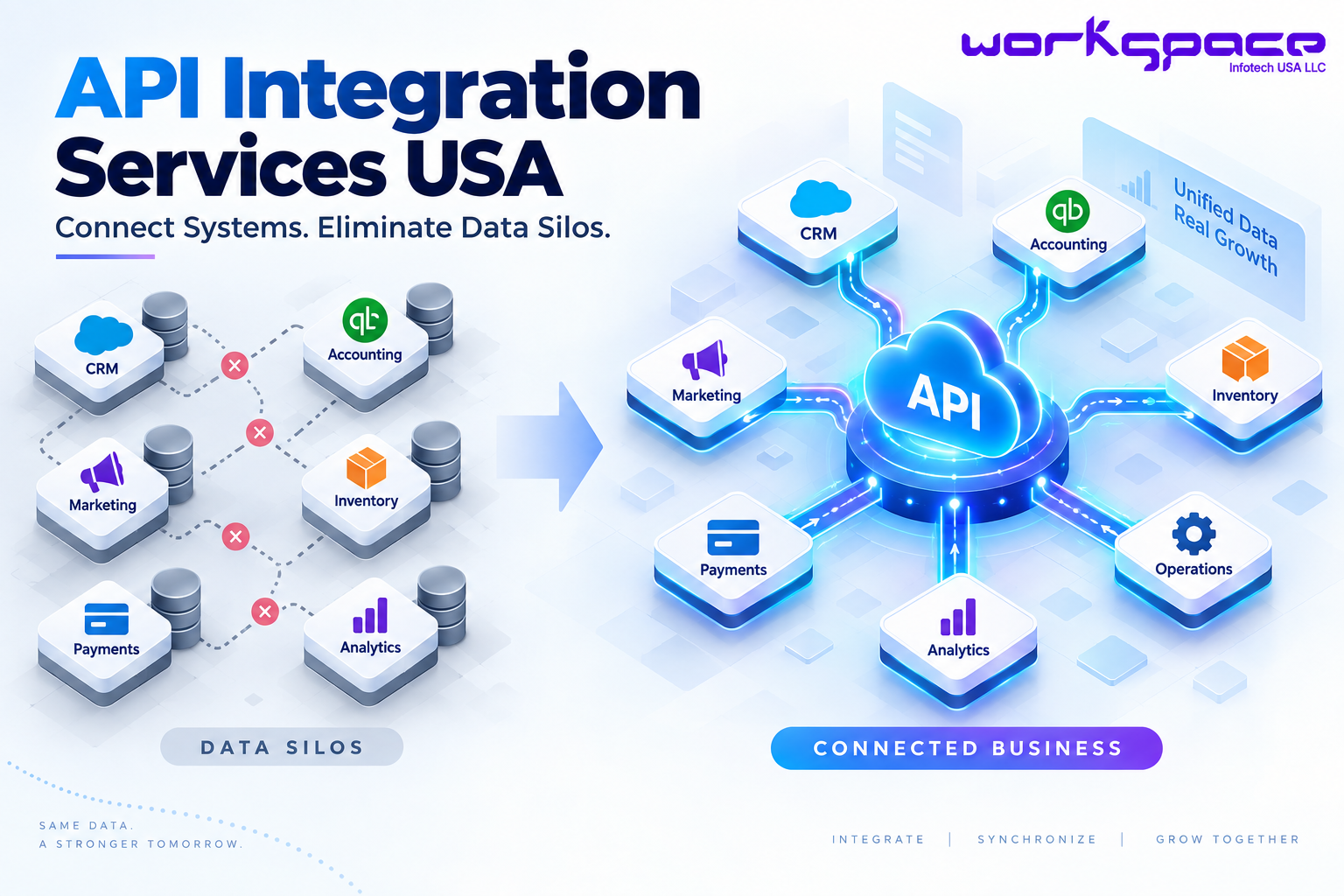
API integration services USA are becoming increasingly important as businesses rely on a growing collection of digital tools to manage their operations. A company may use one system for customer relationships, another for accounting, another for inventory, and separate platforms for payments, marketing, analytics, and internal operations.
There is nothing inherently wrong with using multiple applications. In fact, specialized software can help different teams work more effectively. The problem appears when these systems operate as isolated environments and employees have to manually move information between them.
That creates what businesses often call data silos. Information exists, but it is trapped inside individual applications rather than flowing smoothly across the organization.
For a growing business, that can translate into duplicated work, inconsistent records, delayed reporting, and a poor customer experience. API integration can help address this problem without requiring the company to replace every system it already uses.
What Is API Integration?
An API, or Application Programming Interface, provides a structured way for software applications to communicate with one another. It allows one application to request, send, or receive information from another according to defined rules.
A simple example is an online store connected to an inventory system. When a customer purchases a product, the order information can be transferred to the inventory platform. The available stock can then be updated, while the order information can also be passed to other systems involved in fulfillment, accounting, or customer management.
Without integration, some of those steps may require manual intervention.
With integration, information can move automatically between the appropriate systems.
This distinction is important because API integration is not about making every application part of one giant system. It is about creating useful connections between systems that need to exchange information.
Why Data Silos Are Becoming a Bigger Business Problem
Data silos often develop naturally as companies grow.
A sales team may adopt a CRM because it needs better customer management. The finance department may use accounting software. Operations may introduce an ERP or inventory platform. Marketing may work with a collection of analytics and automation tools.
Each decision can make sense individually.
The difficulty comes when the business needs information from several of those systems at the same time.
Imagine a sales representative speaking with an existing customer. The representative may need to check the customer’s contact information, previous orders, outstanding invoices, support history, and recent interactions. If that information exists across several disconnected platforms, the employee may need to search multiple systems before answering a simple question.
At a small scale, this may seem manageable.
As transaction volumes and employee numbers increase, however, these small inefficiencies become part of the company’s operating cost.
The Hidden Cost of Disconnected Software
The cost of disconnected systems is not limited to employee time.
When information is manually transferred between applications, there is also a greater opportunity for mistakes. A customer address might be entered incorrectly. An order might not be reflected immediately in another system. A report might be based on information that is no longer current.
These problems can affect departments differently.
Sales may struggle to see the latest customer activity. Operations may not have immediate visibility into orders. Finance may wait for information from another department before completing a process.
The business may technically have all the necessary data, but employees cannot access it efficiently.
This is why integration should be considered an operational improvement, not simply a technical upgrade.
Where API Integration Can Create Real Business Value
The best integration opportunities usually exist where information repeatedly moves between systems.
Consider an e-commerce business. A customer places an order through the website. The order needs to reach the payment system, inventory platform, shipping workflow, accounting software, and CRM.
If those systems are disconnected, employees may need to perform several steps manually.
A well-designed integration can allow the appropriate information to move between those platforms automatically. That can reduce repetitive work while giving different departments access to more consistent information.
The same principle applies to professional services, healthcare, manufacturing, logistics, education, financial services, and other industries. The systems may be different, but the underlying challenge is often similar: important information needs to move between different parts of the business.
Common Business Systems That Can Be Connected
Before integrating systems, businesses should identify which connections actually support important workflows. The following examples illustrate common integration opportunities:
| Business System | Possible Connections | Potential Business Benefit |
|---|---|---|
| CRM | Website, marketing, support, sales tools | More consistent customer information |
| ERP | Accounting, inventory, procurement, CRM | Better coordination across operations |
| E-commerce | Payment, inventory, shipping, CRM | Smoother order processing |
| Payment Platform | Accounting, subscriptions, order systems | Less manual financial data entry |
| HR Platform | Payroll, employee management, reporting | More efficient employee data management |
| Analytics Platform | CRM, website, marketing, sales systems | More connected business reporting |
The important point is that not every business needs all of these integrations.
A company should start by identifying where disconnected information is creating the greatest operational friction. Connecting one high-value workflow can often be more useful than attempting to integrate every application simultaneously.
API Integration vs. Manual Data Transfer
Businesses sometimes continue with manual processes because they appear simple and inexpensive.
The problem is that manual processes become increasingly difficult to maintain as transaction volume grows.
For example, entering 20 customer records manually might not seem significant. Doing the same thing thousands of times across several platforms is a very different situation.
The comparison becomes clearer when looking at the two approaches:
| Manual Data Transfer | API Integration |
|---|---|
| Employees transfer information between systems | Systems exchange information automatically |
| Repetitive work consumes employee time | Reduces repetitive data-entry tasks |
| Manual mistakes are more likely | Can improve data consistency |
| Processes become harder to manage as volume grows | Automated workflows can support growing business activity |
| Information may be updated at different times | Data can be exchanged according to defined rules |
API integration does not mean every process becomes completely automated. Some business decisions will always require people.
The goal is to remove unnecessary manual steps around those decisions so employees can spend more time on work that actually requires their expertise.
Integration Should Start With the Workflow
One of the biggest mistakes businesses can make is approaching integration as a purely technical exercise.
A company may say, “We need to connect our CRM and ERP.”
But that is not yet an integration strategy.
The more important question is:
What business process should improve when these systems are connected?
Suppose a company wants customer information from its CRM to appear in its ERP. The project needs to establish which customer information should be transferred, when it should be transferred, which system is considered the source of truth, and what should happen when information conflicts.
These are business decisions as much as technical decisions.
This is why effective API integration services USA should begin with understanding the workflow and then determining how technology can support it.
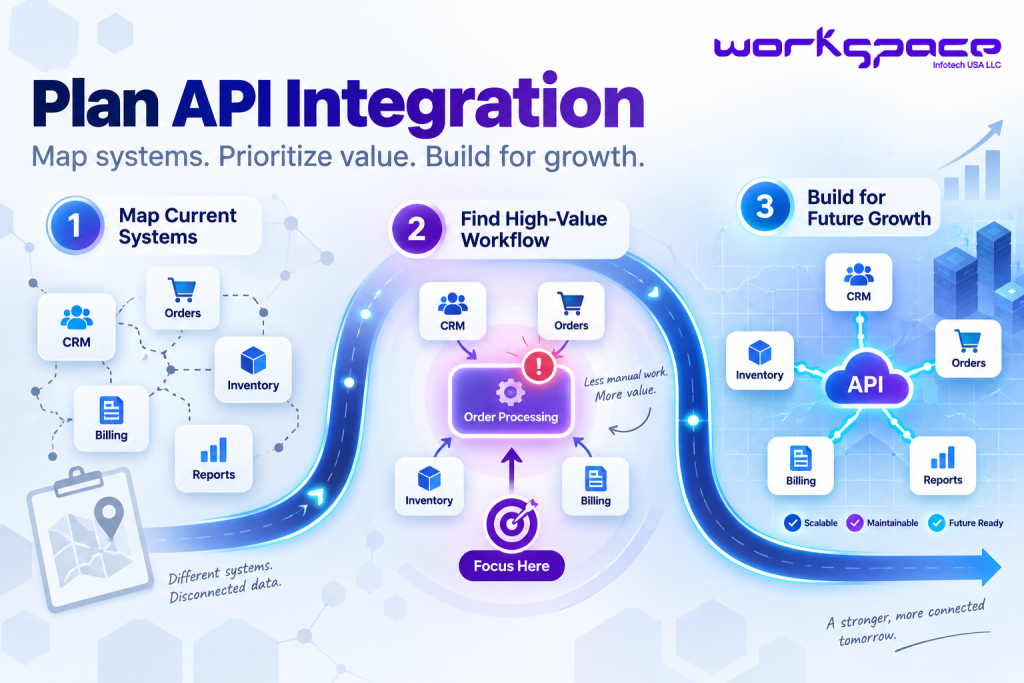
A Practical Approach to Planning API Integration
Businesses do not need to integrate everything at once.
A phased approach can make the process easier to manage.
Start by mapping the current environment
Identify the systems being used and understand what information each one stores. Pay particular attention to processes where employees repeatedly copy, export, import, or reconcile information.
Identify the highest-value problem
Look for the workflow where integration could produce a measurable improvement. This could be reducing manual data entry, speeding up order processing, improving customer visibility, or making reporting more reliable.
Design the connection around future needs
The integration should be maintainable as the business grows. New applications, additional data, higher transaction volumes, and changing workflows should be considered during the architecture stage.
This approach creates a more manageable path toward connected business operations.
Security Is Part of the Integration, Not an Afterthought
Connecting two systems creates a pathway through which information can move. That means security needs to be considered alongside functionality.
Businesses should understand what information is being transferred, which systems can access it, and how that access is authenticated and controlled.
Depending on the application, integration architecture may need authentication, authorization, encryption, access controls, logging, monitoring, and appropriate error handling.
The requirements will differ from one project to another. A simple internal integration does not necessarily have the same security considerations as a system handling financial or sensitive customer information.
The objective is straightforward: data should be accessible to the systems that need it without creating unnecessary exposure.
API Integration and AI-Powered Business Automation
The importance of integration is growing as businesses introduce AI into their software environments.
AI applications are most useful when they can work with relevant business information. An AI assistant, for example, may need access to customer records, product information, documents, transactions, or internal knowledge before it can provide meaningful results.
APIs can provide the connection between those sources.
Consider an AI-powered customer support workflow. The AI system could retrieve approved information from a CRM or knowledge base, provide an answer, and then pass an approved action to another business system.
The AI model is only one part of that workflow.
The underlying integrations determine how effectively the AI can access and act on business information.
This means businesses considering AI should also consider whether their existing systems can communicate effectively.
When Should a Business Invest in API Integration?
Not every disconnected system needs immediate integration.
The investment makes the most sense when the problem has become large enough to affect productivity, customer experience, reporting, or operational scalability.
A business should pay particular attention when employees repeatedly perform the same data-transfer tasks, when departments regularly work with inconsistent information, or when adding another application creates even more manual work.
Integration can also become valuable when a business is scaling.
Processes that worked for a small team may become inefficient once the number of customers, employees, transactions, or systems increases.
In that situation, integration can become part of the company’s broader digital transformation strategy, rather than simply a standalone technical project.
Our Recommendation for Businesses
Businesses should resist the temptation to integrate software simply because the technology makes it possible.
Start with the problem.
Find the processes where disconnected systems are costing the organization time, creating inconsistent information, or preventing teams from working efficiently. Then determine whether integration can solve that specific problem.
A focused project is often easier to measure and improve than a large integration initiative with unclear objectives.
It is also worth considering the future. If the company expects to add new software, expand into new markets, or introduce AI-powered automation, the integration architecture should be flexible enough to accommodate that growth.
The goal is not to create more connections. The goal is to create better business processes.
Final Thoughts
Modern businesses depend on multiple software platforms because no single application can solve every operational need.
The challenge is making those platforms work together.
With the right approach, API integration services USA can help businesses reduce data silos, minimize repetitive work, improve information flow, and create a stronger foundation for automation.
The most effective integration strategy is not necessarily the biggest one.
It is the one that connects the right systems, solves a clearly defined business problem, protects important data, and leaves room for future growth.
For companies looking at their current technology environment, the first question should therefore not be:
“What software should we replace?”
It should be:
“Where is disconnected information slowing our business down?”
That question is often where the best integration opportunity begins.