- Safayet
- 0 Comments
- 687 Views
In many organizations, the idea of building custom software starts with a familiar frustration: teams are juggling spreadsheets, employees are manually entering the same data into multiple systems, and leadership lacks real-time visibility into operations.
The solution often seems obvious—build software tailored to the business.
But before any CEO, CFO, or investor approves the budget, they ask one critical question:
“Why should we invest in this?”
That is where a business case comes in.
A well-prepared business case demonstrates how custom software will solve specific business problems, reduce costs, improve efficiency, and generate a measurable return on investment (ROI). It transforms software development from a technical expense into a strategic business decision.
In this article, we will walk through a step-by-step framework for building a compelling business case for custom software investment.
What Is a Business Case for Custom Software?
A business case is a structured document that explains why a company should invest in a software solution.
It typically includes:
- The business problem
- Proposed solution
- Estimated costs
- Expected benefits
- ROI calculations
- Risks and mitigation plans
Its primary purpose is to help decision-makers evaluate whether the investment aligns with business goals and provides sufficient value.
Why Businesses Choose Custom Software
Off-the-shelf software can work for standard needs, but many growing companies require tools designed around their unique workflows.
Custom software offers several strategic advantages:
- Tailored functionality
- Integration with existing systems
- Scalability as the business grows
- Ownership and full control
- Competitive differentiation
For example, a healthcare provider may need a HIPAA-compliant platform, while a logistics company may require route optimization and real-time tracking.
These specialized requirements are often difficult—or impossible—to address with generic software.
Signs Your Business Needs Custom Software
Your organization may be ready for custom software if:
- Employees rely heavily on spreadsheets
- Data is scattered across multiple systems
- Manual processes create delays
- Existing tools lack critical features
- Subscription costs for multiple SaaS products are increasing
- Teams cannot access real-time reports
- Business growth is being constrained by outdated systems
When these issues become recurring operational bottlenecks, custom software can deliver significant value.
Step 1: Define the Business Problem
Every strong business case begins with a clearly articulated problem.
Instead of saying:
“We need better software.”
Say:
“Our operations team spends 25 hours per week manually processing orders, resulting in delayed deliveries and customer complaints.”
The problem statement should answer:
- What is happening?
- Who is affected?
- What is the business impact?
- How often does it occur?
The more specific and measurable the problem, the stronger your case becomes.
Step 2: Establish Business Objectives
Once the problem is defined, identify the outcomes you want to achieve.
Common objectives include:
- Reduce operational costs
- Increase employee productivity
- Improve customer satisfaction
- Accelerate order processing
- Minimize human error
- Enable real-time reporting
Use SMART goals whenever possible.
Examples:
- Reduce invoice processing time by 70%
- Increase lead conversion by 20%
- Cut support response time in half
Clear objectives provide the foundation for measuring ROI.
Step 3: Gather Stakeholder Input
Successful software investments require alignment across departments.
Key stakeholders often include:
- Executive leadership
- Operations managers
- Finance teams
- Sales and marketing
- IT departments
- End users
Conduct interviews and workshops to understand:
- Pain points
- Current workflows
- Reporting needs
- Integration requirements
- Compliance concerns
When stakeholders contribute to the planning process, adoption improves significantly.
Step 4: Estimate the Total Cost of Ownership
Software costs extend beyond development.
Your business case should include all costs over a three- to five-year period.
Initial Costs
- Discovery and requirements analysis
- UI/UX design
- Software development
- Testing and quality assurance
- Deployment
Ongoing Costs
- Hosting and cloud infrastructure
- Maintenance and bug fixes
- Security monitoring
- Feature enhancements
- Technical support
Additional Costs
- Data migration
- Staff training
- Change management
For a deeper understanding of pricing models, see Software Development Costs Explained: Fixed Price vs Time & Materials.
Step 5: Quantify Expected Benefits
Benefits can be both financial and strategic.
Tangible Benefits
- Labor savings
- Reduced error costs
- Increased sales
- Lower software subscription expenses
Intangible Benefits
- Better customer experience
- Improved decision-making
- Enhanced brand reputation
- Greater employee satisfaction
Example
Suppose employees spend 30 hours weekly on manual tasks.
- 30 hours × $20/hour = $600 per week
- $600 × 52 weeks = $31,200 annual savings
This single improvement can justify a large portion of the investment.
Step 6: Calculate ROI and Payback Period
ROI helps leadership assess financial viability.
ROI = \frac{Total\ Benefits – Total\ Costs}{Total\ Costs} \times 100
Example Calculation
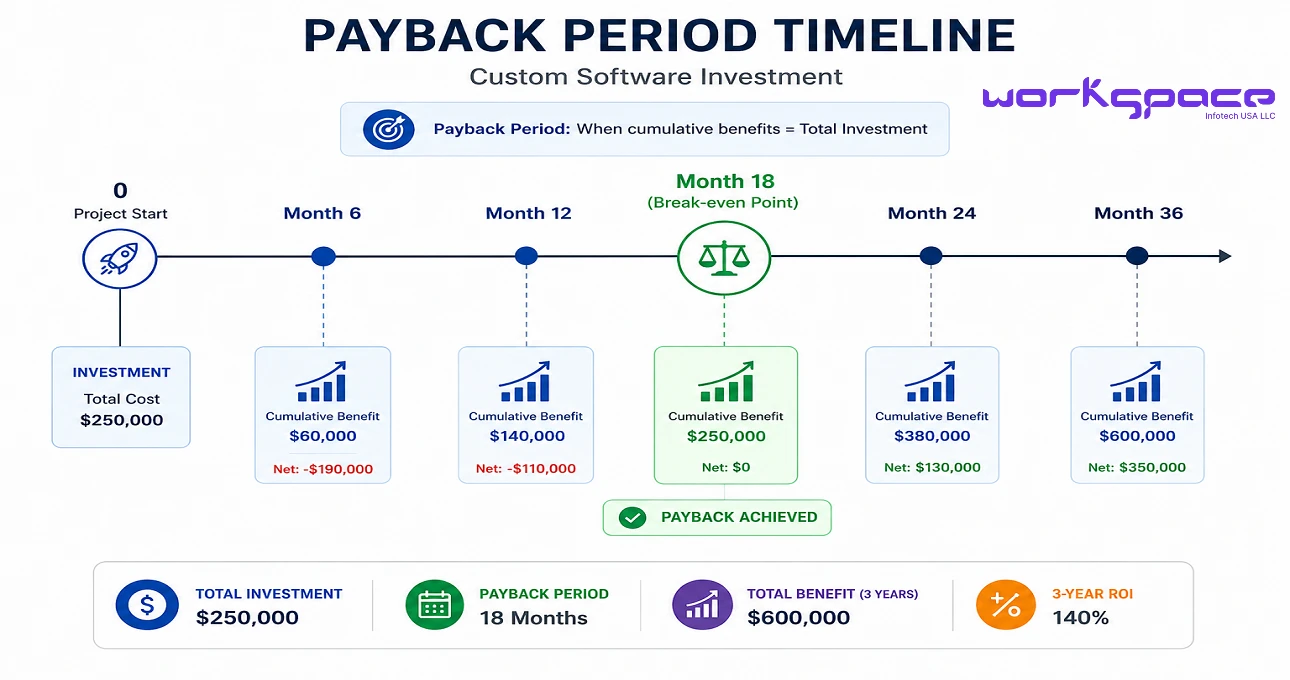
- Total investment: $60,000
- Annual savings: $35,000
- Three-year benefits: $105,000
ROI:
- ($105,000 – $60,000) ÷ $60,000 × 100 = 75%
Payback Period
- $60,000 ÷ $35,000 = 1.7 years
This means the software pays for itself in approximately 20 months.
Step 7: Compare Custom Software to Off-the-Shelf Solutions
Decision-makers often ask whether existing SaaS tools can solve the problem.
Off-the-Shelf Software
Advantages:
- Faster implementation
- Lower upfront costs
Disadvantages:
- Limited customization
- Ongoing subscription fees
- Vendor dependency
- Poor fit for unique workflows
Custom Software
Advantages:
- Fully tailored to business needs
- Easier integration
- Greater scalability
- Full ownership
Disadvantages:
- Higher initial investment
- Longer development timeline
Learn more in Custom Software vs Off-the-Shelf Software.
Step 8: Identify Risks and Mitigation Strategies
Every software project carries risk.
Common risks include:
- Scope creep
- Budget overruns
- Delayed timelines
- Low user adoption
- Security vulnerabilities
Mitigation strategies include:
- Detailed requirements gathering
- Agile development methodology
- Regular stakeholder reviews
- Thorough QA testing
- End-user training
Addressing risks upfront increases executive confidence.
Step 9: Align with Strategic Business Goals
The strongest business cases show how software supports broader organizational objectives.
Examples include:
- Digital transformation
- Geographic expansion
- Regulatory compliance
- Improved customer service
- Data-driven decision-making
When software investment is directly tied to strategic priorities, approval becomes much easier.
Step 10: Prepare an Executive Summary
Senior leaders may only read the first page.
Your executive summary should include:
- The problem
- Proposed solution
- Estimated investment
- Expected benefits
- ROI
- Recommendation
Keep it concise, factual, and focused on business outcomes rather than technical details.
Real-World Example
A distribution company struggled with manual inventory tracking and order processing.
Current Challenges
- Frequent stockouts
- Data entry errors
- Delayed reporting
Proposed Solution
A custom inventory and procurement management platform.
Investment
- Development cost: $80,000
Annual Benefits
- Labor savings: $25,000
- Reduced inventory losses: $20,000
- Additional sales: $15,000
Total annual benefit: $60,000
Results
- Payback period: 16 months
- Three-year ROI: 125%
This is the type of evidence executives find compelling.
Best Practices for Building a Strong Business Case
To improve your chances of approval:
- Use real operational data
- Quantify both costs and benefits
- Include conservative assumptions
- Address risks transparently
- Align with strategic goals
- Keep financial analysis simple
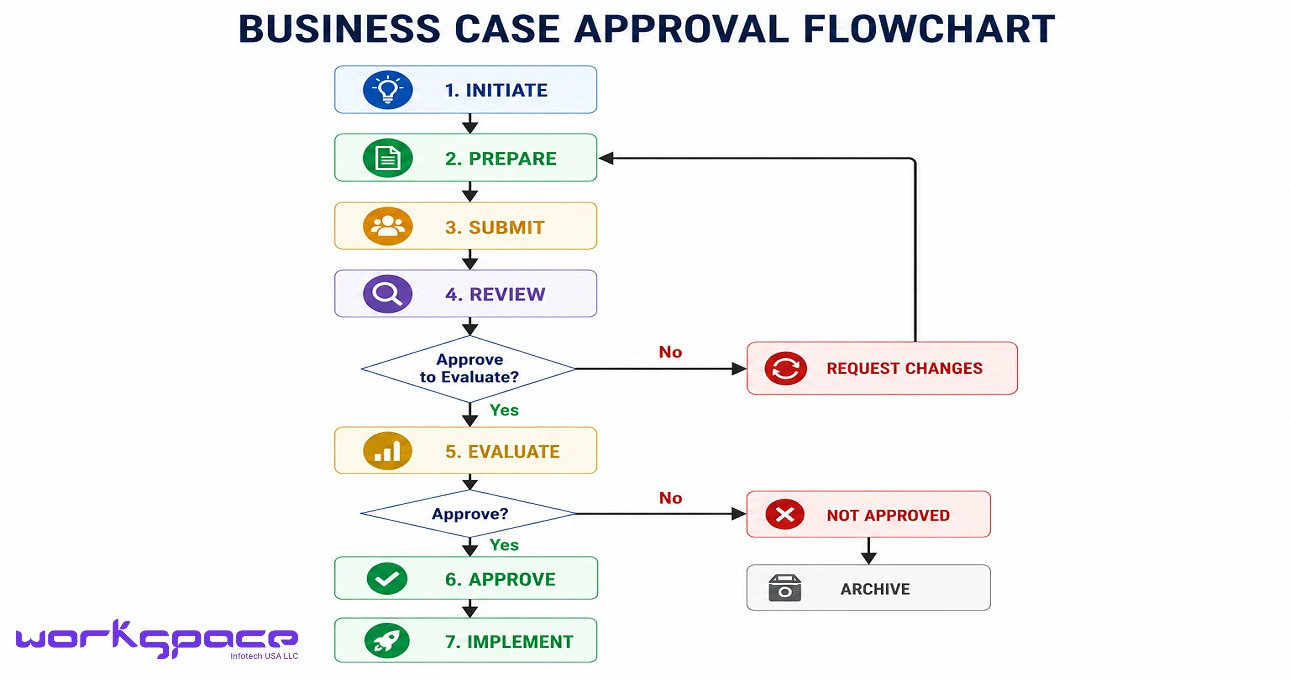
A business case should tell a clear story: there is a problem, software solves it, and the return justifies the investment.
Why the Right Development Partner Matters
A trusted software partner can significantly strengthen your business case.
An experienced development team helps you:
- Validate requirements
- Estimate costs accurately
- Identify technical risks
- Build scalable architecture
- Provide long-term support
Workspace InfoTech USA – Custom Software Development Services offers end-to-end support from strategy and design to development and maintenance.
Final Thoughts
Custom software is more than a technology project—it is a strategic investment.
When supported by a well-structured business case, leadership can clearly see:
- What problem will be solved
- How much it will cost
- What benefits will be gained
- How quickly the investment will pay off
By following the framework in this guide, you can present a compelling, data-driven justification that earns executive approval and sets your project up for success.
For additional insights on digital transformation and investment strategy, Harvard Business Review provides excellent research and analysis.