- Sanzida Afrin
- 0 Comments
- 43 Views
Business process automation software is changing how companies handle repetitive work, approvals, information transfer, and everyday operational tasks. As businesses grow, processes that once seemed manageable can become slow and difficult to control. Employees may spend hours entering information, following up on approvals, preparing reports, or moving data between different systems.
The problem is not necessarily that employees are inefficient. Often, the process itself was designed around manual work.
A customer request may need to pass through several departments. An invoice might require multiple approvals. A new employee may need accounts created across several systems. A sales opportunity may need to move from a website form into a CRM and then trigger follow-up tasks.
When these activities depend heavily on people remembering what to do next, delays and inconsistencies become difficult to avoid.
Business process automation provides a way to redesign these workflows so software can handle predictable steps while employees remain responsible for decisions that require judgment.
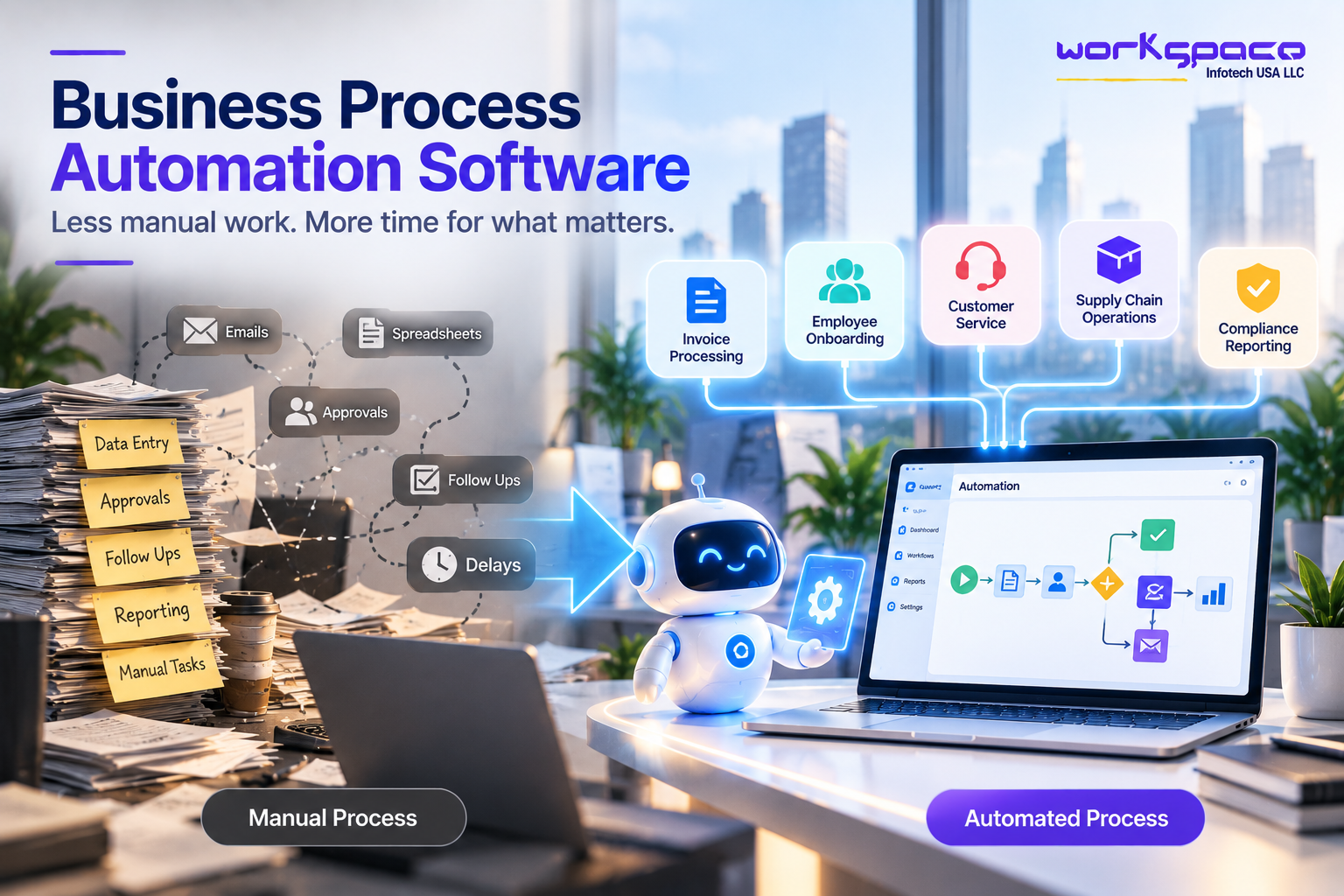
Microsoft describes business process automation as the use of technology to streamline routine and repetitive work, with common applications including invoice processing, employee onboarding, customer service, supply chain activities, and compliance reporting.
What Is Business Process Automation Software?
Business process automation software uses technology to manage defined business workflows automatically. Instead of relying on employees to manually move a process from one step to another, software can trigger actions based on predefined conditions.
Imagine an employee submitting a purchase request.
In a manual process, the request might be sent by email, reviewed by a manager, forwarded to finance, recorded in a spreadsheet, and eventually passed to procurement.
An automated workflow can route the request to the appropriate person, record the approval, update the relevant system, and trigger the next step.
The important distinction is that automation does not simply automate an individual task. It can coordinate an entire workflow from one stage to another.
IBM defines business process automation as a strategy for automating complex and repetitive processes, particularly workflows that involve multiple activities or departments.
Why Manual Processes Become Difficult as a Business Grows
Manual work is not always inefficient.
For a small company processing a handful of requests each week, manually reviewing and updating information may be perfectly reasonable.
The situation changes when volume increases.
A business that receives hundreds of customer requests cannot expect employees to manually perform every follow-up. A growing finance department may struggle if every invoice requires several email exchanges. An expanding sales team may lose opportunities if leads are not assigned and followed up consistently.
The issue is scale.
When the number of transactions increases, the amount of repetitive work increases with it. Employees may spend more time coordinating processes and less time performing work that requires expertise.
Automation can help businesses separate the predictable parts of a workflow from the decisions that still require human involvement.
Where Business Process Automation Creates the Most Value
The best automation opportunities are usually not the most complicated processes.
They are often the repetitive processes that happen frequently and follow a reasonably predictable sequence.
For example, employee onboarding can involve collecting information, creating accounts, assigning training, notifying departments, and completing documentation. Much of that process can follow consistent rules.
Invoice processing is another example. An invoice can enter the system, be checked against predefined information, routed for approval, and recorded once the appropriate conditions are met.
Customer service can also benefit. Incoming requests can be categorized and routed to the appropriate team, while notifications and follow-ups can happen automatically. Microsoft identifies areas such as HR onboarding, invoice processing, contract approvals, supply chain management, customer service, and compliance reporting as common business process automation use cases.
Common Business Processes That Can Be Automated
The following examples show how automation can fit into different departments without requiring the entire organization to change its systems at once.
| Business Area | Example of Manual Process | Possible Automation |
|---|---|---|
| Sales | Assigning new leads manually | Automatically route leads based on predefined rules |
| Finance | Sending invoices for approval by email | Route invoices through a digital approval workflow |
| HR | Creating accounts for new employees | Trigger onboarding tasks and notifications |
| Customer Service | Manually assigning support requests | Automatically categorize and route requests |
| Operations | Updating several systems after an order | Synchronize information across connected systems |
| Management | Preparing recurring reports manually | Collect and organize data automatically |
This does not mean AI should replace traditional automation. In many businesses, the strongest approach is to use rule-based automation for predictable processes and AI where interpretation is genuinely useful.
IBM similarly distinguishes traditional workflow automation from approaches that combine automation with AI capabilities for more dynamic processes.
The Role of APIs in Business Automation
Automation becomes significantly more useful when different business systems can communicate.
Suppose a company receives a new order through its website. The order may need to update inventory, notify fulfillment, record payment information, and update the customer’s CRM profile.
If those applications are disconnected, automation becomes limited.
APIs can allow information to move between systems according to defined rules. This means an automation workflow can trigger actions across multiple applications rather than operating inside a single platform.
This is particularly important for businesses that already have established CRM, ERP, accounting, e-commerce, or internal systems.
Instead of replacing everything, businesses can often improve their existing technology environment by connecting the systems that matter most.
How to Identify a Good Automation Opportunity
Not every process should be automated.
A useful starting point is to look at the work employees perform repeatedly. If a process happens frequently, follows predictable steps, requires multiple handoffs, or creates recurring data-entry work, it may be a good candidate.
However, frequency alone is not enough.
A process might happen frequently but involve complex decisions that require human expertise. Automating such a process without understanding the decision-making involved can create more problems than it solves.
A better approach is to map the workflow first.
Understand what happens today, who performs each step, which systems are involved, where delays occur, and what happens when something goes wrong.
Microsoft recommends starting with process mapping and prioritizing processes that are repetitive, high-volume, error-prone, or important to compliance.
How Businesses Can Introduce Automation Without Creating More Complexity
Automation itself can become complicated when businesses try to change too much at once.
A company might identify dozens of processes that could potentially be automated and attempt to transform all of them simultaneously. That can make it difficult to measure results and harder for employees to adapt.
A phased approach is generally easier to manage.
Start with one clearly defined workflow. Establish what the current process costs in time or effort. Automate the appropriate steps, monitor the result, and make improvements based on what happens in practice.
Once the workflow is stable, the organization can move to the next opportunity.
This approach also makes it easier to establish measurable goals. Microsoft recommends using pilots, clear KPIs, and gradual expansion when implementing process automation.
Measuring Whether Automation Is Actually Working
Installing automation software does not automatically mean a process has improved.
Businesses need to measure the outcome.
For one workflow, the most useful measurement might be processing time. For another, it could be the number of manual steps, error rates, customer response time, or the percentage of tasks completed within a target period.
Consider an invoice approval process that previously took three days. After automation, the business may discover that most invoices are now processed within one day.
That is a measurable operational improvement.
Other benefits may be less obvious. Employees may spend less time chasing approvals, managers may have better visibility into outstanding work, and customers may receive faster responses.
Microsoft recommends measuring both quantitative outcomes such as time saved, error rates, transaction costs, and cycle times, as well as qualitative outcomes such as employee and customer experience.
The Connection Between Automation and Digital Transformation
Business process automation is often one part of a broader digital transformation strategy.
Digital transformation does not simply mean purchasing new software. It involves changing how technology supports the way an organization operates.
Automation can become a practical starting point because it addresses specific operational problems.
A company might begin by automating invoice approvals. Later, it may connect finance with its ERP. It might then integrate customer data with its CRM and introduce analytics to understand workflow performance.
Over time, these individual improvements can contribute to a more connected digital operating environment.
The important thing is to avoid automating a poor process without first understanding it.
Automation can make a good process faster, but it can also make a bad process happen faster.
Our Recommendation for Businesses
Businesses should begin automation with a process problem, not with a software product.
Before choosing an automation platform or commissioning custom software, document how the process currently works. Identify where employees spend unnecessary time, where information is repeatedly entered, and where delays or errors occur.
Then choose one workflow where the expected improvement is clear.
Keep the first implementation focused enough to measure. Once the business understands the results, it can decide whether the same approach should be expanded to other departments or processes.
For organizations with existing CRM, ERP, e-commerce, or internal applications, integration should also be considered from the beginning. Automation becomes much more powerful when information can move between the systems employees already depend on.
The long-term objective should not be “automate everything.”
It should be “make important business processes easier, faster, and more reliable.”
Final Thoughts
Business process automation software can help organizations reduce repetitive work without removing people from the decisions that matter.
The greatest opportunity is often found in everyday processes that have gradually become complicated: approvals, data entry, customer requests, reporting, onboarding, order processing, and information handoffs.
By mapping those workflows, identifying the right opportunities, connecting existing systems, and measuring the results, businesses can introduce automation in a controlled way.
AI will continue expanding what automation can do, but not every workflow needs AI. Traditional rule-based automation remains valuable for predictable processes, while AI can add capabilities where interpretation and context are required.
The future of business automation is therefore unlikely to be about replacing every manual activity.
It is about giving people better systems to work with.